How it works?
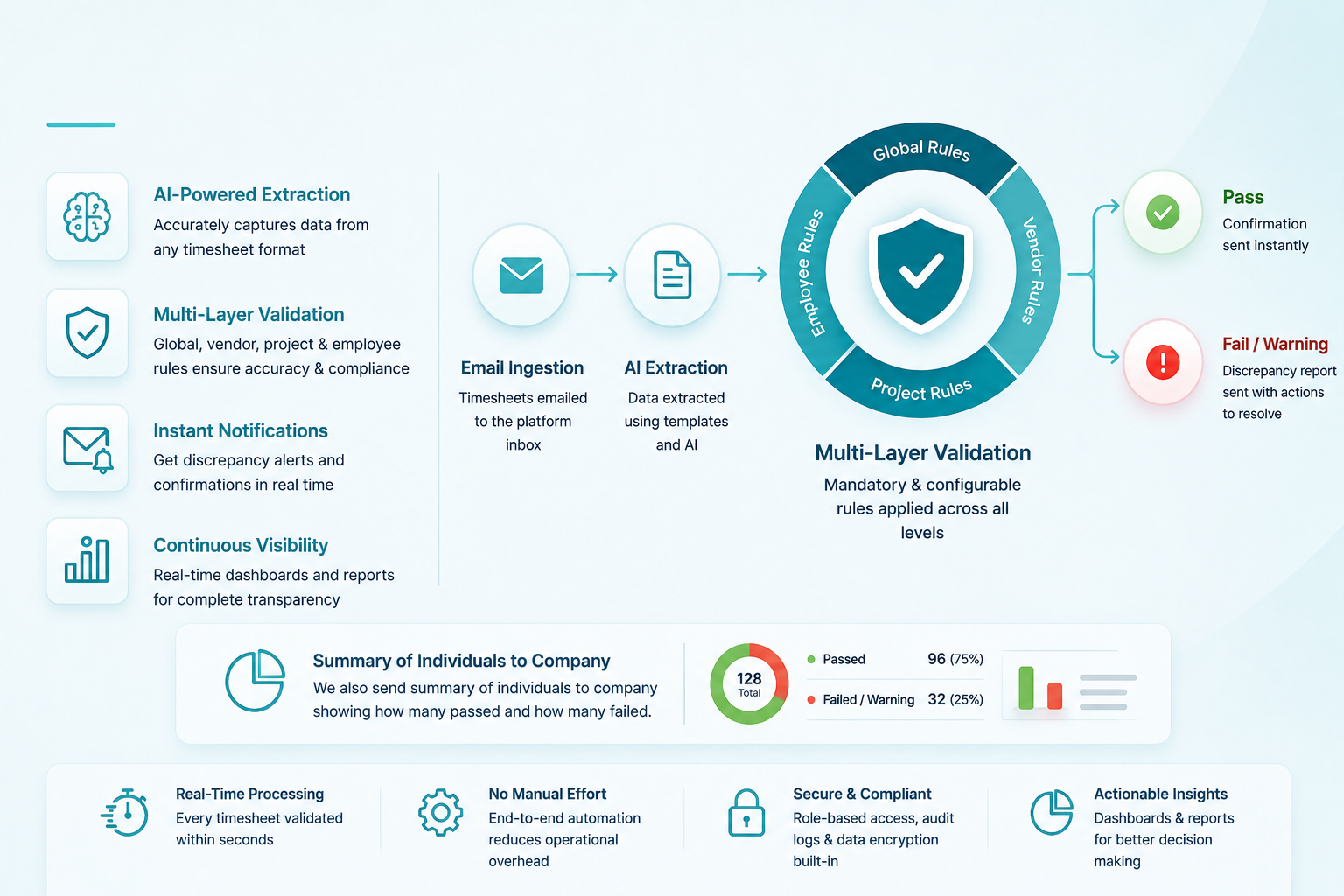
Continuously monitor, extract, validate, and process vendor timesheets using AI-driven workflows, configurable business rules, and automated email ingestion.
Manual validation and batch-based processing create delays, payroll risks, and operational bottlenecks.
Errors are usually discovered close to payroll runs, leaving little time for corrections and causing unnecessary escalation cycles.
Teams spend hours reviewing employee IDs, project codes, overtime limits, and duplicate submissions manually.
Vendors submit timesheets in different templates, file formats, and layouts, making standardisation difficult.
Built using an event-driven microservices architecture for continuous processing, scalability, and no-code rule management.
Every incoming timesheet immediately triggers an independent validation pipeline without waiting for batch cycles.
Each microservice independently handles ingestion, extraction, and validation while persisting data centrally.
Validation rules are configurable from the Admin Portal without redeployment or engineering changes.
Template-based extraction combined with AI fallback ensures accurate parsing across multiple timesheet layouts.
The platform continuously monitors a dedicated inbox and automatically validates all incoming submissions.
The IMAP Listener continuously scans the platform inbox for unread emails with supported attachments.
Incoming sender addresses are matched against the Authorised Sender Registry to identify the vendor.
Supported files such as PDF, Excel, CSV, JPG, and PNG are extracted and queued for processing.
The validation engine applies all rule layers and automatically sends PASS, WARNING, or FAIL notifications.
Built-in compliance rules ensure payroll integrity and cannot be overridden.
| Rule | Condition | Action |
|---|---|---|
| Max Daily Hours | Daily hours greater than 8 | FAIL + Discrepancy |
| Max Weekly Hours | Weekly total greater than 40 | FAIL + Discrepancy |
| Duplicate Timesheet | Overlapping employee date range | Block Processing |
| Invalid Employee ID | ID not found in employee registry | FAIL + Alert |
| Unregistered Sender | Email not mapped to active vendor | Reject + Admin Alert |
And Many More.
Configure vendors, templates, projects, employees, and notifications through a guided onboarding process.
Register vendor details, billing contacts, and assign a unique Vendor ID.
Map approved sender email addresses used for timesheet submissions.
Configure field mappings for employee IDs, dates, project codes, and hours.
Set overtime policies, project limits, billing thresholds, and approval requirements.
Submit a sample timesheet to verify onboarding configuration before activation.
Improve payroll accuracy, reduce operational overhead, and accelerate validation cycles.
Detect discrepancies early before they impact payroll processing or compliance.
Process documents immediately instead of waiting for end-of-cycle batch validation.
Instantly notify submitters and payroll teams about discrepancies, warnings, and approvals.
Eliminate manual validation bottlenecks with AI-powered extraction, configurable rules, and automated email ingestion.
Request a Demo
 +91 7702820516